您现在的位置是:网站首页> 编程资料编程资料
百度编辑器ueditor前台代码高亮无法自动换行解决方法_网页编辑器_
 2023-05-25
339人已围观
2023-05-25
339人已围观
简介 百度编辑器ueditor前台代码高亮无法自动换行解决方法_网页编辑器_
问题描述:
在内容里面插入代码高亮显示,后台编辑器中是可以自动换行的,但是发表后,在前台查看,发现代码不能自动换行,直接超出了内容页的边界,极不美观,虽然复制是可以完整的。
解决办法:
找到高亮代码显示的css文件 /e/data/ecmseditor/ueditor/third-party/SyntaxHighlighter/shCoreDefault.css
具体的路径根据你的ueditor做改动
找到
复制代码 代码如下:
.syntaxhighlighter{width:100%!important;margin:.3em 0 .3em 0!important;position:relative!important;overflow:auto!important;background-color:#f5f5f5!important;border:1px solid #ccc!important;
改成
复制代码 代码如下:
.syntaxhighlighter{width:100%!important;margin:.3em 0 .3em 0!important;position:relative!important;overflow:auto!important;background-color:#f5f5f5!important;border:1px solid #ccc!important;word-break:break-all;
就是加上 word-break:break-all;
可能不同的ueditor版本css写法不一样,只要对应的位置加上这个强制换行就可以了
最终效果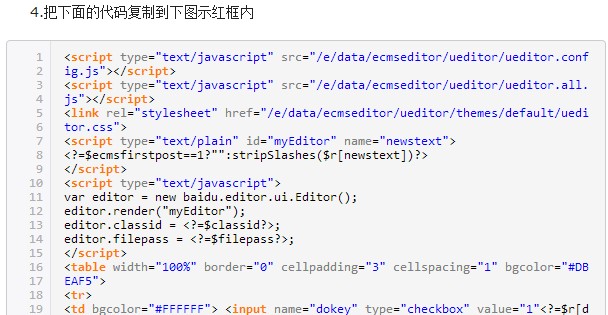
相关内容
- syntaxhighlighter 去掉右上角问号图标的三种方法_网页编辑器_
- 为SyntaxHighlighter添加新语言的方法_网页编辑器_
- CKEditor 取消转义的两种方法_网页编辑器_
- ckeditor插件开发简单实例_网页编辑器_
- UEditor 编辑器跨域上传解决方法_网页编辑器_
- 关于jsp版ueditor1.2.5的部分问题解决(上传图片失败)_网页编辑器_
- kindSoft在线网页编辑器简单的配置参数介绍_网页编辑器_
- ajax php实现给fckeditor文本编辑器增加图片删除功能_网页编辑器_
- SyntaxHighlighter配合CKEditor插件轻松打造代码语法着色_网页编辑器_
- Fckeditor XML Request error:internal server error (500) 解决方法小结_网页编辑器_